
If you have a free hour or looking to gain some more information about how to use your Apple product optimally then have a look at iStore Meets. iStore always offered free workshops when purchasing an Apple product from the iStore and now these workshops are all available online. I attended and completed one of the workshops and it was an educational sixty minutes spent. The iStoreMeets sessions vary between Apple products, iPhone, iPad or Macbooks but also during the #COVID19 #LockdownSA it seems extra helpful to have extra tips and advice from #Apple on topics such as #Fitness, #Coding and even #Parenting. Parenting in the Digital world is one of the sessions available and I find the emphasis on digital education with Apple so important in today’s time.
I completed the #iPhone #Videography iStore Meets session and these are some notes from my experience…
The iStore Meets session registration form is simple, it has the details of the session and requires you to enter in your email address. The invitation is then sent to you via email with a link to a Zoom meeting to begin. What’s great about the session is that an industry professional runs the iStore Meets workshop so all their extra tips and experience is shared in your sessions. It is simple and easy to use and there’s no pressure for you to participate if you don’t want to. You can put forward questions via a chat box and the presenter will get to it through the video presentation. Simple easy way to spend an hour of your morning at home learning some new #tech skills while relaxing on your bed on the couch.
In the iStore Meets iPhone Videography session I joined, our session was led by Hloni Coleman, an amazing videographer and iPhone user. He shared many tips on how to shoot better videos and which tools to use for editing. One major tip I would like to share is to always remember a moving video is better than a shaky video. Most people think you always need a tripod for excellent videos, but if you’re moving while taking a video you get so much more footage to work with and instead of trying to keep still and have shaky footage, you’ll have interactive footage to work with while editing and good motion closer to objects, people and views.
See below a snip of my iStore Meets session and tips on what you need for a good video:
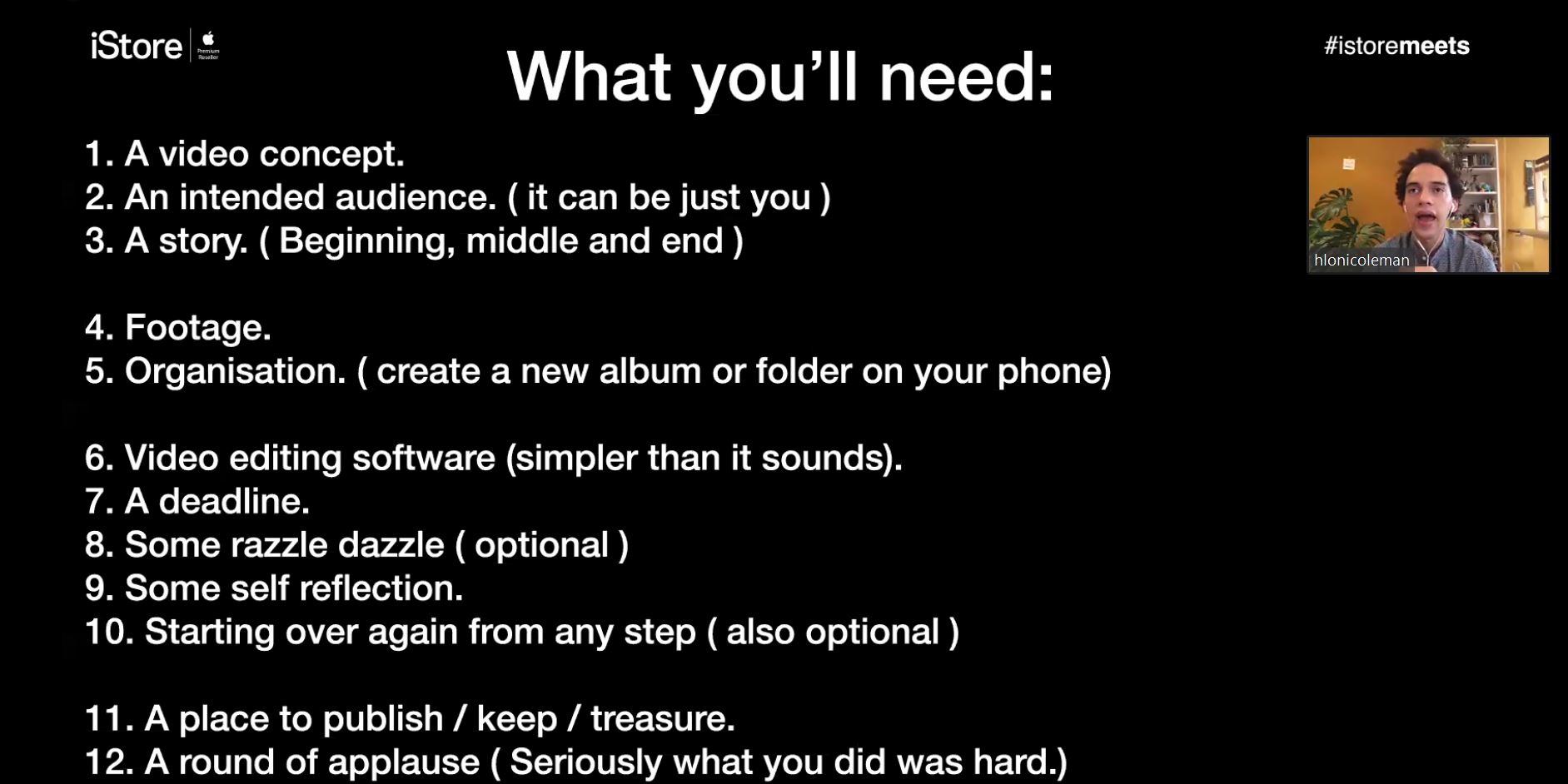
I cannot wait to for lockdown to end to put some of the lessons learned to practice and make some short memorable moments and always remembering that in order to get great videos you always need lots of no.4 in the above image… footage!
Make use of your free time and sign up for an iStoreMeetsSession.
Feel free to comment. #StaySafeStayHome
Follow us, Like us and Please share!
Thanks. MeetingFocus Blog




 Meeting Focus
Leave a comment